
Features

Everything your case needs, now with an AI assistant.

Join over 400 people who use Court Clerk to manage their case. Every tool you rely on is still here, and the AI Assistant can now fill each one in for you from a file you upload or a sentence you type.

Feature by feature

Do it yourself, or ask your AI assistant.

Each feature below works the way it always has. The purple box shows what the AI Assistant can do in that part of your case.

app.mycourtclerk.com
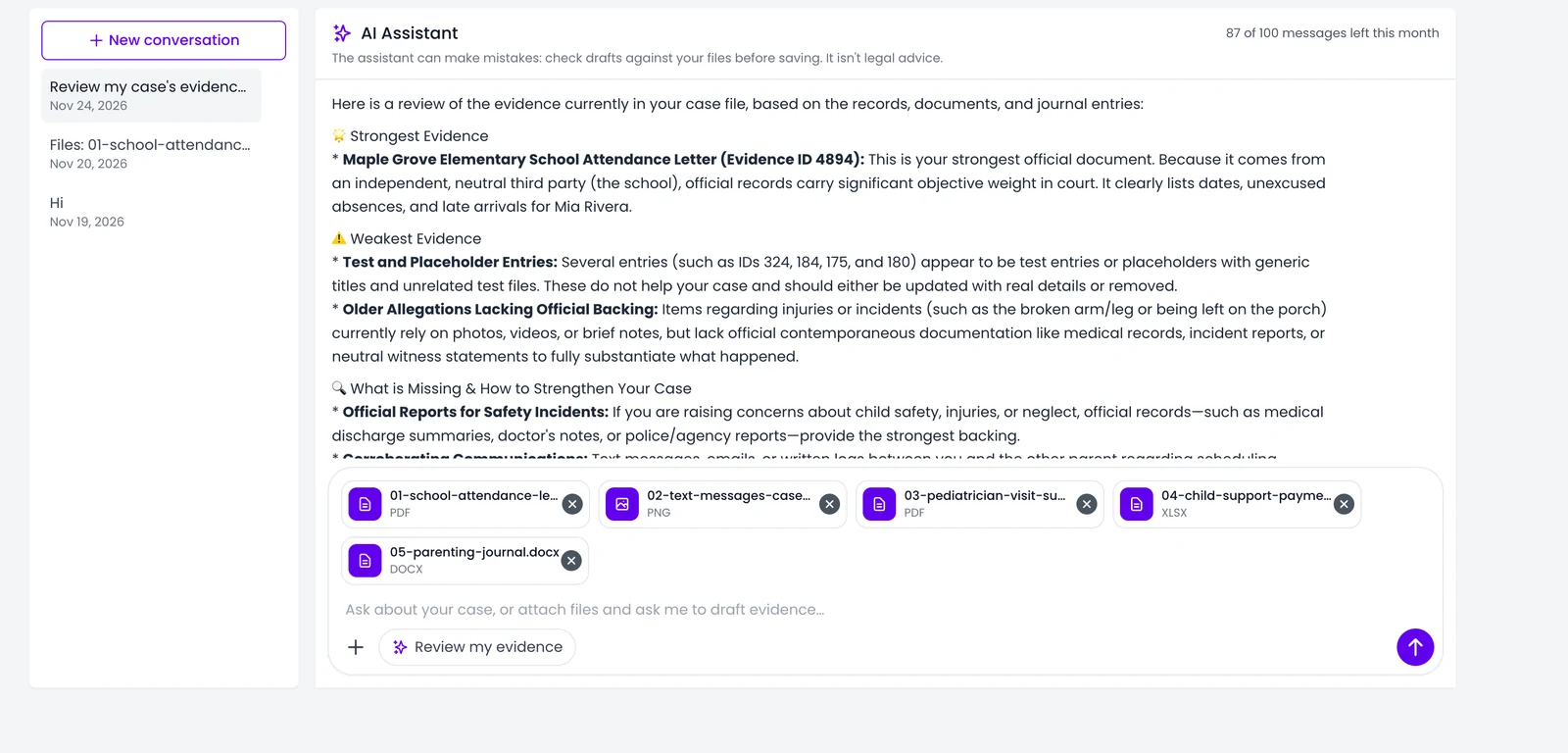
AI Assistant reviewing a case: strongest evidence, weakest evidence and what is missing
"Review my evidence" shows your strongest evidence, the weakest, and what's missing. Sample case data.

Your evidence

One of the most important parts of your case will be your evidence. Court Clerk makes it easy to upload, tag and prioritize all of your evidence with our simple web and mobile app.

Attach files, photos, videos and more to each piece of evidence so you have all of your proof when you need it.

AI Assistant

Upload a document, screenshot, photo, recording or video and the assistant analyzes it, pulls out the key moments, and creates tagged, prioritized evidence entries.

Try: "Find every missed pickup in these texts."

Your witnesses

There will be times during your case when you need to add witnesses and their testimony. Add a witness with their contact information, testimony and proof directly to your case.

You can also add witnesses on the other side, so you have a game plan for your next move.

AI Assistant

People named in your files become witness records, with their role and contact details, linked to the evidence they relate to.

Try: "Who was at the March 6 exchange?"

Your court documents

Add all of your court documents to Court Clerk. If they arrive by email, forward the email with its attachments directly to your case, or take a picture of the documents from the web or mobile app.

Your important court documents go wherever you go.

AI Assistant

Summarize a long order in plain English, pull out its deadlines, and draft exhibit lists and case summaries from what's already in your case.

Try: "What does this order require me to do?"

Your timelines

View your entire case and its history from multiple timeline views, built from your evidence and court records.

AI Assistant

Events from your evidence, journal and voice memos are placed on the timeline in date order, with the source attached.

Try: "Add everything from January to my timeline."

Your custody calendars

Managing custody times and dates is one of the hardest parts of a divorce, so Court Clerk has a full custody calendar built in. Add your recurring custody schedule, one-time events and more.

An attendance checklist keeps track of missed days, late days and more.

AI Assistant

Describe your arrangement in a sentence and the assistant builds the schedule, including holidays and swaps.

Try: "Set up a 2-2-3 starting Monday, with me on Thanksgiving."

Your events and activities

Court cases have a lot of moving parts. Add hearings, appointments and other events in a few clicks, from weekly recurring events to single events that run over several days.

AI Assistant

Dates mentioned in your documents and emails go straight onto your calendar.

Try: "Add the hearing date from this notice."

Your to-do list

Add a to-do for every important task. Set a date and time and it goes on your to-do list and calendar. Behind schedule? Snooze a task until later in a few clicks.

AI Assistant

Turn what your attorney asked for into dated to-dos.

Try: "My lawyer needs pay stubs and bank statements by Friday."

Your daily journal

The most important part of your case is you. Write down what happened each day, what didn't, and your thoughts, in a secure place.

AI Assistant

Tell the assistant about your day and it writes a clear, dated journal entry.

Try: "Log today: pickup was 40 minutes late again."

Your voice memos

Upload a recorded voice file or record a new one from the web or mobile app. Every memo is transcribed automatically, so you can print it or play it back online.

Name, tag and organize every memo to keep track of important notes.

AI Assistant

The assistant reads your transcripts and turns them into evidence, timeline events and to-dos.

Try: "Pull the dates out of yesterday's voice memo."

Your chats

Communication matters, so Court Clerk includes real-time chat. Invite people already on your case, or invite a third party to a specific channel without giving them access to your whole case.

All communication about your case stays in one place.

AI Assistant

Chat with the AI Assistant right alongside your case channels. Ask questions about your own case files any time.

Try: "What did my attorney ask me for last week?"

Your file storage and case data

Your files are stored in your own folders on our secure servers. Drag in files from your computer, create folders and sub-folders, and move files with simple select and move.

View and export your data your way, from your entire case to just the files you've tagged Positive. Print any page or download specific files when you need them.

AI Assistant

Find anything in your case by describing it, and let the assistant file new uploads into the right place.

Try: "Show me every photo tagged Positive from March."

Your lawyer and case workers

A case involves several people with different roles. Invite people to your case as an Editor or a Viewer, depending on the access you want to give them.

You can also invite people to a chat channel as guests without giving them access to your case.

AI Assistant

Your attorney gets a case that's already organized, with evidence analyzed and a timeline ready to review.

Attorneys: see the firm version

30-day money-back guarantee

Get started with Court Clerk today.

Bring your files in and let the AI Assistant get your case in order.

Get started See pricing